

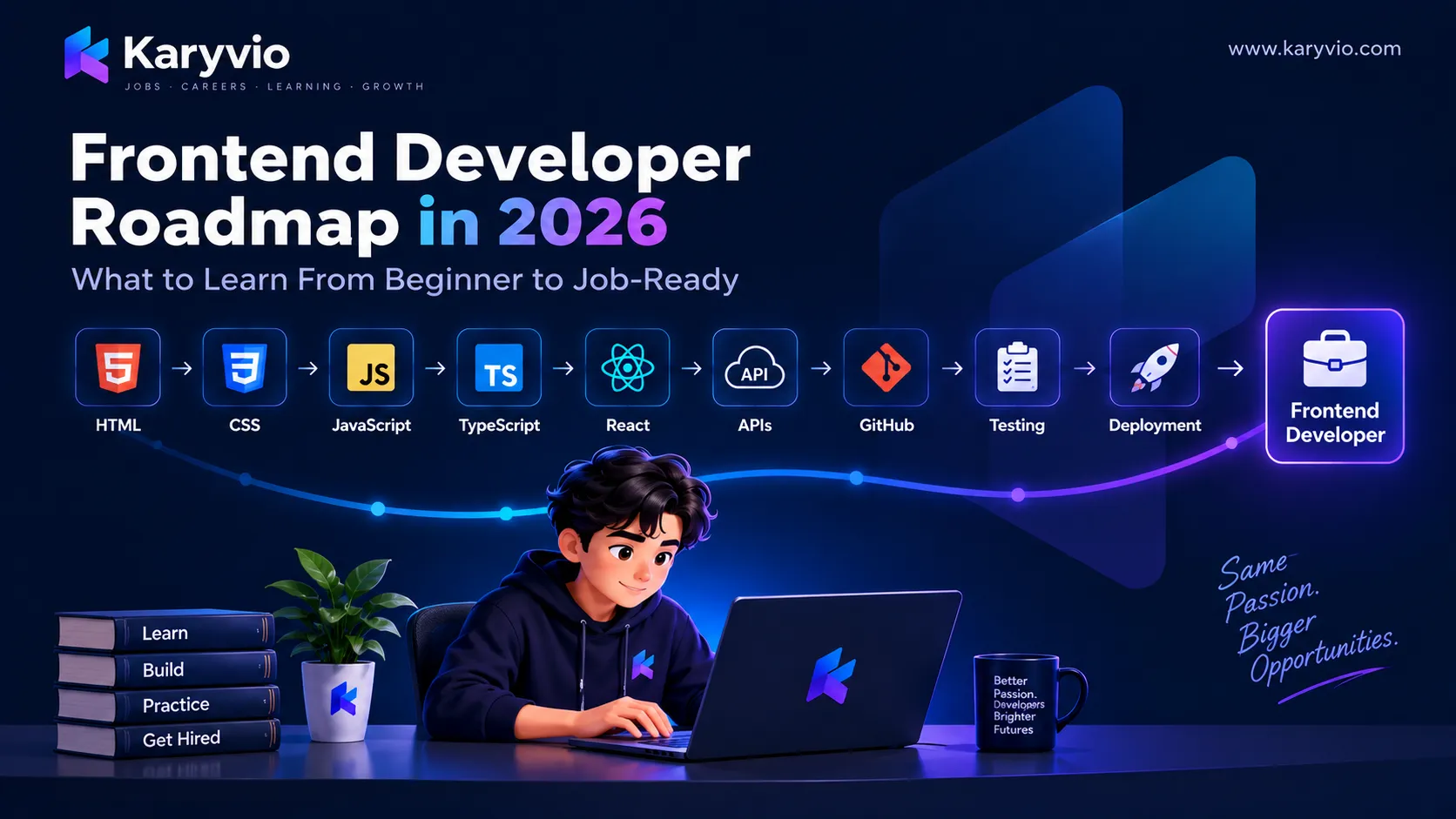
Frontend Developer Roadmap in 2026: What to Learn From Beginner to Job-Ready
Want to become a frontend developer? This roadmap explains what to learn from HTML and CSS to JavaScript, React, Git, APIs, testing, performance, and deployment—with a practical path toward becoming job-ready.
Tools used: Git, Github, VS Code, Browser DevTools
Prerequisites: Basic computer knowledge and an interest in learning web development. No professional frontend development experience is required.
Frontend Developer Roadmap in 2026: What to Learn From Beginner to Job-Ready
Frontend development is one of the most accessible ways to start a career in software development.
You can begin with a simple web page using HTML and CSS, then gradually learn JavaScript, modern frameworks, APIs, testing, performance, and deployment.
The difficult part isn't finding hundreds of technologies to learn.
The difficult part is knowing what to learn, in what order, and when you're ready to move to the next level.
This roadmap gives you a practical path from beginner to job-ready frontend developer.
You don't need to learn every frontend framework. Build strong fundamentals first, then specialize in the tools used by the roles you're targeting.
Frontend Development Roadmap
A practical learning sequence looks like this:
You can adjust the technologies based on your goals, but the fundamentals should come first.
1. Start With HTML
HTML provides the structure of a web page. Before learning complex JavaScript frameworks, understand how HTML works.
Learn These Concepts
- Elements
- Attributes
- Headings
- Paragraphs
- Links
- Images
- Lists
- Tables
- Forms
- Buttons
- Semantic HTML
- Accessibility basics For example:
<!DOCTYPE html>
<html lang="en">
  <head>
    <meta charset="UTF-8" />
    <meta name="viewport" content="width=device-width, initial-scale=1.0" />
    <title>My First Website</title>
  </head>

  <body>
    <header>
      <h1>My Developer Portfolio</h1>
    </header>

    <main>
      <p>Welcome to my portfolio.</p>
      <a href="/projects">View my projects</a>
    </main>
  </body>
</html>
Don't rush through HTML.
Understanding semantic structure will help later with accessibility, SEO, maintainability, and frontend frameworks.
2. Learn CSS
HTML gives your page structure.
CSS controls how that structure looks and behaves visually.
Focus On
- Selectors
- Colors
- Typography
- Box model
- Margin and padding
- Display
- Positioning
- Flexbox
- CSS Grid
- Responsive design
- Media queries
- Transitions
- Basic animations
- CSS variables
Flexbox Example
.container {
  display: flex;
  justify-content: space-between;
  align-items: center;
  gap: 1rem;
}
Responsive Design
Your website should work across different screen sizes.
A simple responsive rule might look like:
@media (max-width: 768px) {
  .container {
    flex-direction: column;
  }
}
Don't learn CSS only by memorizing properties. Build interfaces and learn the properties while solving real layout problems.
3. Understand Responsive Web Design
Modern websites need to work across:
- Mobile phones
- Tablets
- Laptops
- Desktop monitors
Start thinking about layouts that adapt instead of designing only for one screen size.
A Simple Responsive Workflow
Mobile layout
→ Tablet layout
→ Desktop layout
Practice by recreating interfaces such as:
- Landing pages
- Dashboards
- Navigation bars
- Blog layouts
- Job cards
- Product pages
The goal is not simply to make something look good.
The goal is to make it usable at different screen sizes.
4. Learn JavaScript
Once you understand HTML and CSS, JavaScript becomes the next major step.
JavaScript allows you to add logic and interactivity to web applications.
Important Concepts
- Variables
- Data types
- Operators
- Conditions
- Loops
- Functions
- Arrays
- Objects
- Destructuring
- Modules
- Scope
- DOM manipulation
- Events
- Promises
- Async/await
- Error handling
- Fetch API
Example
async function getUsers() {
  try {
    const response = await fetch("/api/users");

    if (!response.ok) {
      throw new Error("Failed to fetch users");
    }

    const users = await response.json();

    console.log(users);
  } catch (error) {
    console.error(error);
  }
}
Don't move to a framework simply because JavaScript feels difficult.
A framework becomes much easier to understand when your JavaScript fundamentals are strong.
5. Learn How the Browser Works
You don't need to become a browser-engine expert.
But understanding the basics will make you a better frontend developer.
Learn about:
- DOM
- CSSOM
- Rendering
- Browser storage
- Cookies
- HTTP requests
- Network requests
- Caching
- Browser developer tools
When you understand what happens after a user enters a URL, many frontend concepts become easier to reason about.
6. Learn Git and GitHub
Git is an essential tool for modern software development.
At minimum, understand:
git clone
git status
git add
git commit
git pull
git push
git branch
git switch
git merge
A basic workflow looks like this:
Example:
git status
git add .
git commit -m "Add responsive navigation"
git push origin main
You should also understand:
- Branches
- Pull requests
- Merge conflicts
.gitignore- Commit messages
- Repository organization
Use Git from the beginning of your learning journey. Don't wait until your first job to learn version control.
7. Learn TypeScript
Once you're comfortable with JavaScript, TypeScript can help you write more predictable code.
TypeScript adds static typing to JavaScript.
For example:
type User = {
  id: number;
  name: string;
  email: string;
};

function greetUser(user: User): string {
  return `Hello, ${user.name}`;
}
Focus On
- Basic types
- Interfaces
- Type aliases
- Functions
- Optional properties
- Union types
- Generics
- Type narrowing
- Utility types
You don't need to understand every advanced TypeScript feature immediately.
Learn the features you encounter while building applications.
8. Learn a Modern Frontend Framework
After your JavaScript fundamentals are strong, choose a framework or library used by the jobs you're targeting.
Popular choices include:
- React
- Vue
- Angular
For many beginners, React is a practical option because it introduces important concepts used in modern frontend applications.
If Learning React, Focus On
- Components
- Props
- State
- Events
- Conditional rendering
- Lists
- Forms
- Hooks
- Routing
- Data fetching
- Component composition
- Error handling
Example:
function UserCard({ user }) {
  return (
    <article>
      <h2>{user.name}</h2>
      <p>{user.email}</p>
    </article>
  );
}
Don't just memorize React APIs.
Understand why component-based architecture is useful.
9. Learn APIs
Frontend applications rarely exist in isolation.
They often communicate with backend services through APIs.
You should understand:
- HTTP methods
- GET
- POST
- PUT
- PATCH
- DELETE
- Status codes
- JSON
- Headers
- Authentication
- Error responses
- Loading states
A typical application flow looks like:
Example:
const response = await fetch("/api/jobs");

if (!response.ok) {
  throw new Error("Failed to fetch jobs");
}

const jobs = await response.json();

console.log(jobs);
Once you understand this flow, building real applications becomes much easier.
10. Learn Forms and Validation
Forms appear everywhere in real applications.
Examples include:
- Login
- Registration
- Job applications
- Search
- Contact forms
- Checkout
- Profile editing
Learn how to handle:
- Input values
- Validation
- Error messages
- Loading states
- Successful submission
- Failed requests
- Accessibility
A good form should tell users what went wrong and how to fix it.
Example Validation Flow
Good form UX is not only about preventing invalid input. It is also about giving users clear feedback.
11. Learn Authentication Basics
You don't need to become a security specialist to understand frontend authentication. Learn the concepts behind:
- Login
- Registration
- Sessions
- Tokens
- Cookies
- Protected routes
- Logout
- Authorization For example:
Never store sensitive credentials or secrets directly in frontend source code. Frontend code is delivered to the user's browser and should be treated as publicly visible.
12. Learn State Management
As applications grow, managing state becomes more complicated. First understand local component state. Then learn when state needs to be shared. Common concepts include:
- Local state
- Shared state
- Server state
- URL state
- Form state Don't immediately add a state-management library to every project. First understand the problem you're trying to solve.
A simple application can often work perfectly well without a large state-management solution.
13. Learn Testing
Testing helps you catch problems before users do. Start with the basics.
Types of Frontend Testing
- Unit testing
- Component testing
- Integration testing
- End-to-end testing Understand what each type is designed to test.
Unit Test
→ Test one small piece of logic

Component Test
→ Test a UI component

Integration Test
→ Test multiple parts working together

End-to-End Test
→ Test a complete user flow
You don't need hundreds of tests for your first project.
Learn how to test important behavior.
14. Learn Accessibility
A professional frontend developer should think about users with different abilities.
Learn the basics of:
- Semantic HTML
- Keyboard navigation
- Labels
- Focus states
- Alternative text
- Color contrast
- Accessible buttons
- Accessible forms
- Screen-reader-friendly structure
For example, prefer:
<button type="button">
  Save Changes
</button>
over creating a clickable element that only looks like a button.
Accessibility isn't just a visual feature.
It is part of building usable software.
15. Learn Web Performance
A beautiful website that loads slowly can still provide a poor experience.
Learn the basics of:
- Image optimization
- Lazy loading
- Code splitting
- Caching
- Reducing unnecessary JavaScript
- Efficient rendering
- Network requests
- Core Web Vitals
Think about performance from the beginning rather than trying to fix everything at the end.
A Simple Performance Mindset
Performance is part of user experience. Don't treat it as something that only matters after a website becomes popular.
16. Learn Deployment
Your project becomes much more useful when people can actually access it. Learn the basics of deploying frontend applications. Understand:
- Build process
- Environment variables
- Domains
- HTTPS
- Hosting
- Deployment pipelines
- Production configuration A typical workflow is:
For every major project, try to have a working demo when possible.
17. Build Projects in Increasing Difficulty
Don't build ten nearly identical projects. Build projects that progressively introduce new concepts.
Project 1 — Personal Portfolio
Learn:
- HTML
- CSS
- Responsive design
Project 2 — Interactive Web App
Learn:
- JavaScript
- DOM
- APIs
Project 3 — React Application
Learn:
- Components
- State
- Routing
- Forms
- API integration
Project 4 — Full Frontend Application
Learn:
- Authentication
- API integration
- State management
- Testing
- Accessibility
- Performance
- Deployment This progression creates increasingly strong evidence of your skills.
18. Build One Project You Can Explain Deeply
Your portfolio doesn't need dozens of projects. One excellent project can teach you more than many small projects. For your strongest project, be able to explain:
- The problem
- The users
- The architecture
- The technology choices
- The components
- The API integration
- Authentication
- Error handling
- Testing
- Performance
- Deployment
- Challenges
- Future improvements
If an interviewer asks you about your project for 20 minutes, you should have enough understanding to keep the conversation technical and meaningful.
19. Common Mistakes Beginners Make
Trying to Learn Everything
There are too many technologies to learn all at once. Better approach: Follow a focused path.
Jumping Into Frameworks Too Early
React, Vue, or Angular won't replace JavaScript fundamentals. Better approach: Build a strong JavaScript foundation first.
Watching Courses Without Building
Tutorials can create the feeling that you're learning without giving you enough practical experience. Better approach: Learn → Build → Get Stuck → Research → Fix → Repeat
Copying Projects Without Understanding Them
A copied project becomes difficult to explain during an interview. Better approach: Change the project, add features, and understand every important part.
Ignoring Git
Waiting until you're job hunting to learn Git creates unnecessary problems. Better approach: Use Git from your first serious project.
Focusing Only on Appearance
A frontend application isn't successful just because it looks attractive. A good frontend should also be:
- Responsive
- Accessible
- Fast
- Reliable
- Maintainable
- Easy to use
20. When Are You Job-Ready?
You don't need to know everything. A reasonable starting point is when you can:
- Build a responsive website
- Write JavaScript confidently
- Use Git and GitHub
- Build a frontend application
- Consume APIs
- Handle forms
- Handle loading and error states
- Explain your code
- Debug common problems
- Deploy a project
- Explain your projects clearly You should also have a few projects that demonstrate these abilities.
Job-Readiness Checklist
- HTML fundamentals
- CSS fundamentals
- Responsive design
- JavaScript fundamentals
- Git and GitHub
- TypeScript basics
- A modern frontend framework
- APIs
- Forms and validation
- Authentication basics
- Testing basics
- Accessibility
- Performance basics
- Deployment
- 2–4 meaningful projects
- Portfolio
- Resume
- Interview preparation
21. A Practical 90-Day Frontend Roadmap
If you're starting from the beginning, you can structure your learning like this.
Days 1–30 — Foundations
Focus on:
- HTML
- CSS
- Responsive design
- JavaScript fundamentals
- Git and GitHub Build:
- Personal portfolio
- One interactive JavaScript project
Days 31–60 — Modern Frontend
Focus on:
- Advanced JavaScript
- TypeScript basics
- React or another target framework
- APIs
- Forms
- Routing Build:
- One larger frontend application
Days 61–90 — Job Preparation
Focus on:
- Testing
- Accessibility
- Performance
- Deployment
- GitHub
- Resume
- Portfolio
- Interview preparation Build:
- One polished portfolio project Then start applying for relevant internships and entry-level opportunities.
You don't have to wait until Day 90 to apply. If your skills and projects are already strong enough for a role, start applying while continuing to learn.
22. What to Learn After the Fundamentals
Once you're comfortable with frontend development, you can explore additional areas. Depending on your career goals, this might include:
- Advanced TypeScript
- Advanced React
- Next.js
- State-management solutions
- GraphQL
- Advanced testing
- Design systems
- Web accessibility
- Performance engineering
- CI/CD
- Cloud platforms
- Backend development Don't treat this list as a requirement. These are next steps, not prerequisites for beginning your career.
Frontend Developer Learning Path
Here's the overall path to remember:
HTML
↓
CSS
↓
Responsive Design
↓
JavaScript
↓
Git & GitHub
↓
TypeScript
↓
React / Frontend Framework
↓
APIs
↓
Forms & Authentication
↓
Testing
↓
Accessibility
↓
Performance
↓
Deployment
↓
Real Projects
↓
Portfolio
↓
Interview Preparation
↓
Frontend Developer Job
Final Thoughts
Becoming a frontend developer is not about memorizing the largest number of technologies.
It's about understanding how the web works and being able to use that knowledge to build reliable, accessible, and useful applications.
Start with:
HTML → CSS → JavaScript
Then progress toward:
Git → TypeScript → React → APIs → Testing → Performance → Deployment
Most importantly, keep building.
Learn the fundamentals. Build real projects. Show your work. Then keep improving.
Quick Checklist
- Learn HTML
- Learn CSS
- Practice responsive design
- Learn JavaScript
- Learn Git and GitHub
- Learn TypeScript
- Learn a modern frontend framework
- Work with APIs
- Build forms and authentication flows
- Learn testing basics
- Learn accessibility
- Learn performance basics
- Deploy your projects
- Build 2–4 meaningful projects
- Create a portfolio
- Prepare your resume
- Practice interviews
- Start applying
Learn → Build → Show → Apply → Improve.
Comments (0)
Be the first to share your thoughts.